Simulation diagrams
Here are some example of simulation diagrams generated by the specula.simul.Simul class.
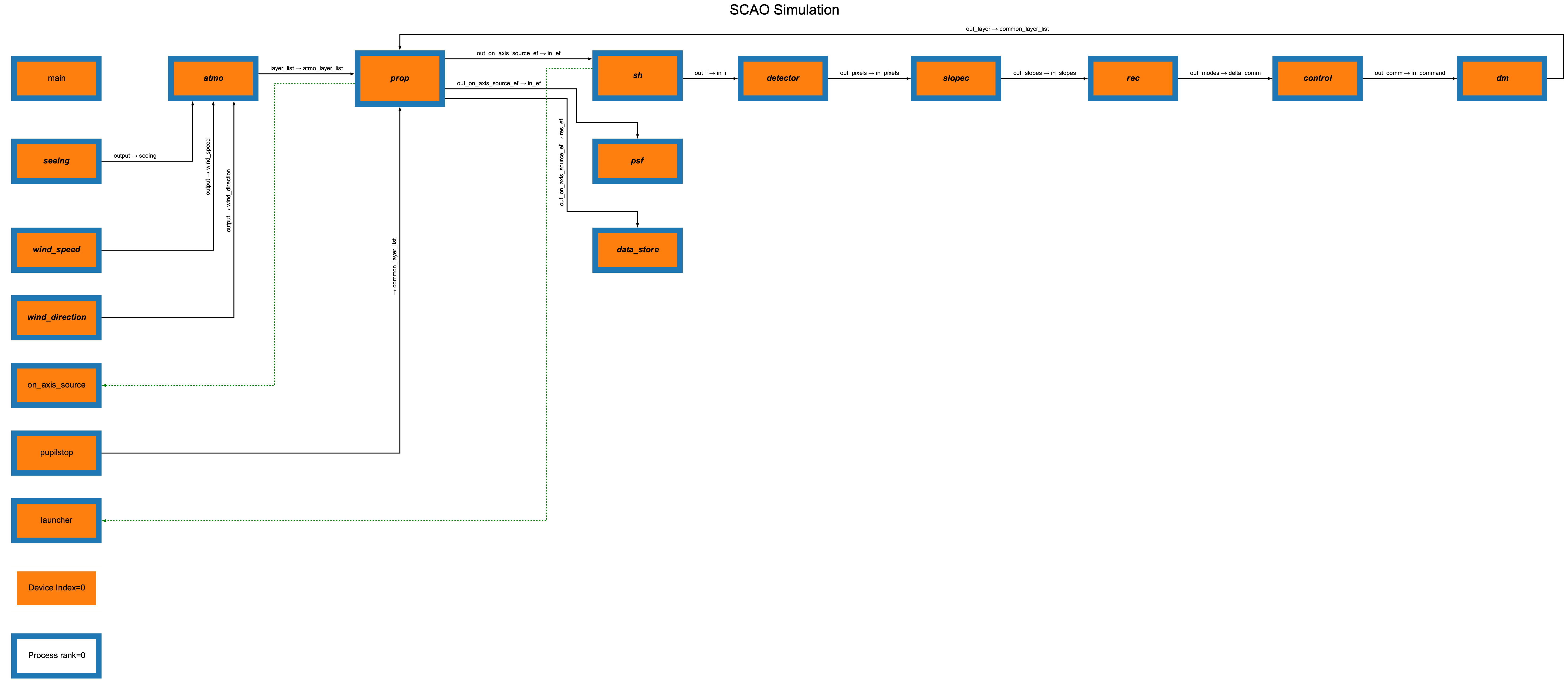
The diagram corresponding to the parameters file config/scao/params_scao_sh.yml can be generated during a simulation with the following command:
specula params_scao_sh.yml --diagram
A file named params_scao_sh.png will be created in the current directory, containing the diagram of the simulation.
The diagram is:

Another example is the diagram corresponding to the parameters file config/scao/params_control_lpf.yml:

Diagram options
The diagram generation supports several options:
--diagram: generate a diagram of the simulation.--diagram-title "My Title": set a custom title for the diagram.--diagram-filename my_diagram.png: set the output filename for the diagram.--diagram-colors-on: color blocks by device index and process rank for easier visualization of parallel/distributed simulations.
You can also specify multiple parameter files and override parameters from the command line using the --override option.
Example with custom options:
specula params_scao_sh.yml --diagram --diagram-title "SCAO Simulation" --diagram-colors-on
Legend
If you use --diagram-colors-on, a legend will be added to the diagram to indicate the meaning of the colors (device index and process rank).
For more details, see the documentation of the specula.simul.Simul class.